Dahlia: A Script Font for Modern Campaigns
As a marketing designer, I often find myself in the middle of a campaign workflow, juggling visuals, messaging, and audience expectations. One day, while preparing a product launch graphic for a seasonal sale, I stumbled upon Dahlia—a modern calligraphy script font that brought a fresh energy to my design process. It wasn’t just another font; it felt like the missing piece that elevated the entire visual language of the campaign.
The Visual Style of Dahlia
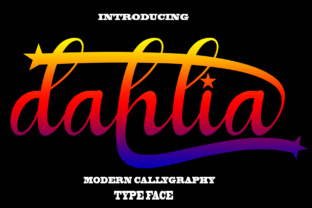
Dahlia is a handwritten script font with a modern twist. Its flowing lines and delicate flourishes give it a personal, almost artisanal feel. The font’s natural writing style makes it feel authentic, as if someone had penned it by hand rather than generated through digital tools. This human touch adds warmth and personality, making it ideal for campaigns that aim to connect emotionally with their audience.
Its decorative elements are subtle but effective, adding visual interest without overwhelming the message. Whether used in headlines or supporting text, Dahlia maintains a balance between elegance and readability, which is crucial when designing for social media, digital ads, or email campaigns.
Real-World Campaign Use Cases
I recently tested Dahlia in a few real-world scenarios. For a YouTube thumbnail promoting an online course, I used it as the main title. The font’s fluidity made the thumbnail stand out on a crowded feed, drawing attention without sacrificing clarity. On mobile screens, where space is limited, Dahlia still held its own—its strokes were distinct enough to be legible even at smaller sizes.
For an Instagram content series, I paired Dahlia with a clean sans serif font for subheadings. The contrast worked well, creating a visual hierarchy that guided the viewer’s eye from the bold, stylized title to the more straightforward supporting text. This combination was especially effective for quote graphics, where the font added a creative flair without distracting from the message.
When Dahlia Shines
Dahlia excels in short, impactful text. It’s perfect for headlines, callouts, logo-style text, and campaign labels. In a recent email promotion for an online shop, I used it for the subject line and header. The font’s personality helped convey a sense of exclusivity and creativity, aligning with the brand’s identity.
It also works well for display text in landing pages, website banners, and branded templates. Its decorative nature makes it ideal for event promotions, webinar banners, and product teasers. However, it’s not suited for long paragraphs or dense information. In those cases, a more traditional serif or sans serif font would be a better choice.
Readability Tips for Digital Campaigns
When using Dahlia in digital campaigns, consider the context. On dark backgrounds, the font’s lighter strokes can still be readable, but you may need to adjust the contrast slightly for maximum impact. On light backgrounds, ensure there’s enough spacing between letters to avoid clutter.
For thumbnails and small previews, keep the text concise. Dahlia’s intricate details might get lost in tiny sizes, so it’s best to use it for titles rather than body copy. When overlaying text on images, test different placements to maintain visibility and legibility.
Font Pairing and Design Considerations
Dahlia pairs well with a variety of fonts. A clean sans serif like Montserrat or Poppins can provide a strong contrast, balancing the script’s ornate style. A classic serif font such as Georgia or Playfair Display can add sophistication, while another script font might create a cohesive, layered look.
Before integrating Dahlia into a campaign, check the available styles, alternates, and ligatures. These features can enhance the font’s versatility, allowing for more dynamic typography. Also, verify the file formats and licensing to ensure it’s suitable for commercial use across all platforms.
Whether you're working on a seasonal sale, a product teaser, or a branded template pack, Dahlia offers a unique blend of modernity and craftsmanship. It’s a premium font that brings a fresh, creative edge to any project, making it a valuable addition to your design toolkit.
In the fast-paced world of digital marketing, having the right typeface can make all the difference. Dahlia isn’t just a font—it’s a tool that helps you tell your story with style, clarity, and character.